October 2026 Apple Update: macOS 27 and iOS 27, Compatibility, and What Treasure Coast Users Should Know
New Title
October is a good time to check that your Apple devices are backed up, compatible, and running the latest software available for them. As of October 15, 2026, macOS 27 Golden Gate is a public release, macOS 27.2 is still in beta, and Apple lists iOS 27.0.1 as the latest iOS release.
Here’s what Mac owners in Martin, Port St. Lucie, and Palm Beach Gardens counties should know before updating.
macOS 27 Golden Gate: September’s public release
The BIG question: Is macOS 27 ready to install? Yes, macOS 27 Golden Gate became publicly available on September 14. Apple’s subsequent macOS 27.0.1 update, released September 28, provides bug fixes and is recommended for Mac users already running macOS 27.
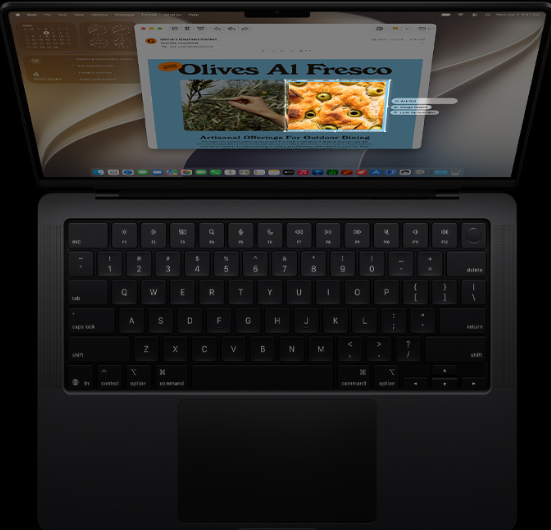
Golden Gate brings changes to Siri and Apple Intelligence, Safari, Photos, Shortcuts, Spotlight, and more. Apple’s update notes say that some features depend on device, language, and region, so not every Mac will offer every feature.
What’s useful in macOS 27?
A few of the changes may make everyday Mac tasks easier:
- Siri AI and onscreen actions: Apple describes a more conversational Siri with Apple Intelligence features, including the ability to use personal context and carry out actions in apps. Visual Intelligence can also respond to selected onscreen content.
- Safari organization: Safari can group tabs by topic, and Notify Me can monitor supported webpages for changes such as price updates or restocks.
- Shortcuts and Photos: Describe a Shortcut lets you create an automation using natural language. Photos adds editing tools such as Spatial Reframing and Extend, along with improvements to Clean Up.
- Design and everyday improvements: Liquid Glass includes a readability adjustment, while Apple notes improvements to Spotlight and Mail search, AirDrop transfers, and network file browsing.
These are highlights, not a promise that every capability will be available on every Mac. Apple’s macOS 27 update notes and feature availability information explain the details.
Compatibility: Intel Macs are not supported
The BIG question: Can your Mac run macOS 27? Apple’s current compatibility page is the place to check before making plans. In general, macOS 27 requires Apple silicon; Intel-based Macs do not support macOS 27.
There’s one detail worth noting: Apple’s compatibility list includes the MacBook Neo with its A18 Pro chip, as well as supported M-series Mac models. So while M-series Macs make up the familiar supported group, the official list also includes that specific A-series MacBook. Don’t rely on the year a Mac was purchased or its appearance to decide, check its exact model against Apple’s official macOS 27 compatibility page.
If your Mac isn’t compatible, that doesn’t automatically mean it has stopped receiving software updates. Apple recommends installing the latest macOS version compatible with your model. Use System Settings > General > Software Update to see the updates Apple offers for that Mac.
macOS 27.2 on October 13: beta, not a routine update
The BIG question: Should you install macOS 27.2 now? Not on a Mac you depend on every day. As of October 15, macOS 27.2 is pre-release beta software, not a finished public update for general use.
Apple’s developer release listing records macOS 27.2 developer beta 4 on October 13. Apple also runs a separate public beta program; developer and public betas are different testing channels and may not be the same build. Either way, a beta is intended for testing and feedback, not as the standard choice for a work or home Mac.
Beta software can include bugs or cause problems with apps, peripherals, or workflows. If you’re curious about testing it, use a Mac that isn’t essential to your work and make a complete backup first. For your main Mac, stick with the released version offered in Software Update and wait for Apple to publish 27.2 as a public release.
iPhone software: iOS 27.0.1 and the iOS 26 option
Apple’s security releases page lists iOS 27.0.1 as the latest iOS release. It arrived September 28 with bug fixes, including fixes for specific camera, touchscreen, and restart issues on supported devices.
If you’re holding off on upgrading to iOS 27, Apple still lists iOS 26.7.1 as an update for people staying on the iOS 26 branch. It includes a security fix for a CoreGraphics issue that Apple says could allow code execution when processing a maliciously crafted file; Apple also reported possible exploitation in sophisticated targeted attacks against earlier iOS versions. Check Apple’s iOS 26.7.1 security information, and install the available security update for your device rather than leaving it unpatched.
These are software updates, not the same thing as jumping to a new major version. Check Settings > General > Software Update on your device to see the version Apple offers.
Before you update: a practical checklist
A few minutes of preparation can help avoid interruptions and protect your files.
- Back up first. Apple’s built-in Time Machine backup can automatically back up your Mac to an external storage device. Confirm your backup has completed before a major upgrade.
- Check the exact model and your apps. Confirm compatibility using Apple’s official page, then check that essential business software, accessories, and workflows work with the new macOS.
- Make room for the installation. Review available storage and remove only files you’re comfortable deleting. If storage is tight or you’re unsure what’s using space, get advice before clearing system files.
- Allow time for the update. Connect a laptop to power and choose a time when you can leave the Mac undisturbed. The Mac may restart during installation; don’t close the lid or force it to shut down.
- Install through Apple’s Software Update. On a Mac, open System Settings > General > Software Update. Apple explains the process in its macOS update guide.
Updates matter for more than new features. Apple says keeping software current is one of the most important ways to maintain device security. For any Mac, install the latest release Apple offers for that particular model.
Need a hand with your Mac on the Treasure Coast?
A new macOS release can bring compatibility questions, update errors, low-storage warnings, or unexpected software problems. Don’t be alarmed if an update doesn’t appear or the installation doesn’t go as expected. An incompatible model, a storage issue, or another underlying problem may be the cause. It’s better to check before trying workarounds that could put your data at risk.
iService FL provides Apple computer repair and software management for MacBook, iMac, and other Apple computer users. Our team has 15 years of experience, including former Apple technicians, and can help with update planning, macOS troubleshooting, virus and malware removal, hardware issues, and data recovery.
We serve customers across Martin, Port St. Lucie, and Palm Beach Gardens counties. Visit us at 4473 SE Commerce Avenue, Stuart, FL 34997. We’re open Monday through Friday, 9 a.m. to 5 p.m., and offer FREE parking.
Call 772-343-7482 to discuss your Mac or schedule an appointment. You can also find details about our Apple computer repair and service and contact iService FL for directions.